KingCalendar for Delphi
A fully-featured VCL calendar component library for Delphi 10.2 through 13, supporting Win32, Win64, and Win64x platforms. Open source, MIT licensed.
About KingCalendar
KingCalendar is a fully-featured VCL calendar component library for Delphi 10.2 through 13, supporting Win32, Win64, and Win64x platforms. Open source under the MIT License.
Full Month Grid
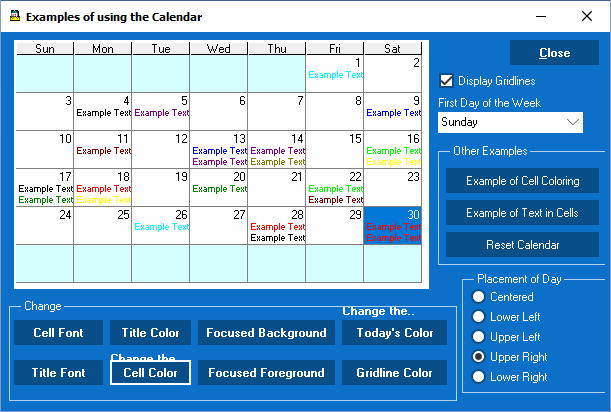
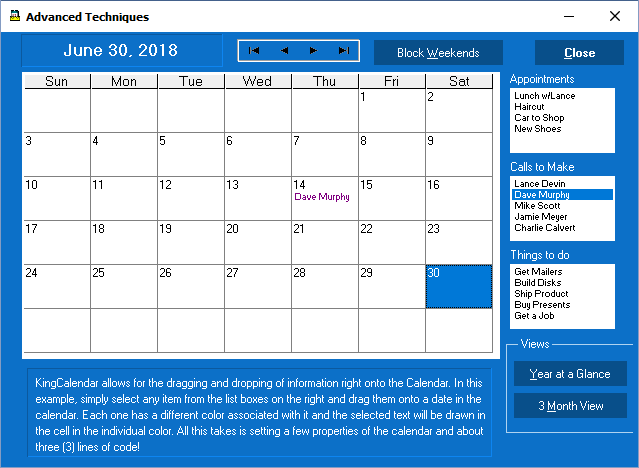
Renders a complete month view with day selection, blocked days, flagged days, and per-cell color customization.
9 Built-in Color Sets
Choose from nine named color schemes via ColorSet1–ColorSet9 properties, or build your own.
Companion Controls
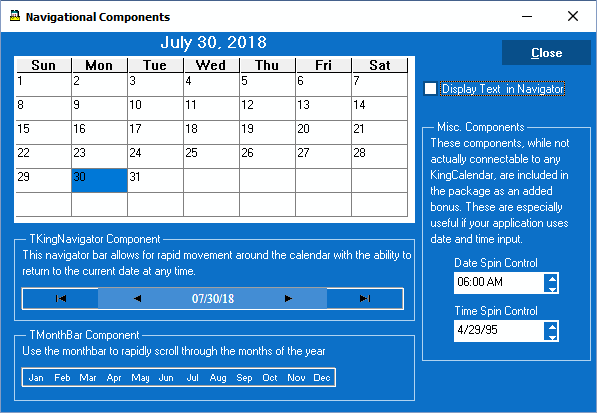
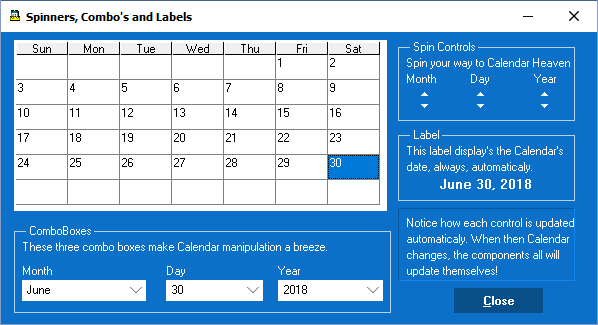
Month/year/day spin and combo controls, week labels, a navigator panel, and a month-bar all bind directly to the calendar.
Popup & Dialog Modes
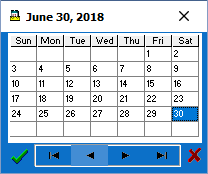
TKingPopup drops down like a date-picker; TKingDateDialog is a standalone date selection dialog.
Database Aware
Six DB-aware components (TDBKingCalendar, TDBKingDateSpin, TDBKingTimeSpin, TDBKingMDYSpin, TDBKingHMSpin, TDBKingDateDialog) bind to TDataSource for seamless dataset integration.
LiveBindings Support
All date/time controls register observable members for Delphi's visual data binding designer. Works with TBindSourceDB and TBindSourceAdapter.
High DPI & VCL Styles
Fully compatible with Delphi's High DPI scaling and VCL Styles runtime theming.
No External Dependencies
Pure Object Pascal. Ships pre-compiled for every supported Delphi version — no third-party runtime required.
Spin Editors
Inline date, time, and MDY spin-button editors for quick keyboard-friendly date entry in any form.
Screenshots
A sample of what KingCalendar looks like in a running application.
Included Controls
All controls register directly in the Delphi IDE component palette.
- TKingCalendarCore month-grid calendar control
- TKingPopupDropdown popup date picker
- TKingDateDialogStandalone date selection dialog
- TDBKingDlgDatabase-bound date picker
- TKingNavigatorPrev/next month & year buttons
- TMonthBarRow of month-selection buttons
- TKingLabelDate-bound label
- TKingWeekLabelWeek-number bound label
- TMonthSpin / TMonthComboMonth navigation spin & combo
- TYearSpin / TYearComboYear navigation spin & combo
- TDaySpin / TDayComboDay navigation spin & combo
- TKingDateSpinInline date spin editor
- TKingTimeSpinInline time spin editor
- TKingMDYSpinMonth/day/year spin editor
- TDBKingCalendarDatabase-aware month-grid calendar
- TDBKingDateSpinDatabase-aware date spin editor
- TDBKingTimeSpinDatabase-aware time spin editor
- TDBKingMDYSpinDatabase-aware month/day/year spin editor
- TDBKingHMSpinDatabase-aware hour/minute spin editor
- TDBKingDateDialogDatabase-aware date selection dialog
Delphi Version Support
The installer reads the BDS.EXE build number to identify the exact
Delphi sub-version and enable only the platforms that release supports.
| Delphi Release | BDS Key | Suffix | Win32 | Win64 | Win64 Modern | WinARM64EC |
|---|---|---|---|---|---|---|
| Delphi 13.1 Florence | 37.0 | 370 |
✓ | ✓ | ✓ | ✓ |
| Delphi 13.0 Florence | 37.0 | 370 |
✓ | ✓ | ✓ | — |
| Delphi 12.1–12.3 Athens | 29.0 | 290 |
✓ | ✓ | ✓ | — |
| Delphi 12.0 Athens | 29.0 | 290 |
✓ | ✓ | — | — |
| Delphi 11.x Alexandria | 28.0 | 280 |
✓ | ✓ | — | — |
| Delphi 10.4.x Sydney | 27.0 | 270 |
— | ✓ | — | — |
| Delphi 10.3 Rio | 26.0 | 260 |
— | ✓ | — | — |
| Delphi 10.2 Tokyo | 25.0 | 250 |
— | ✓ | — | — |
Win64 Modern (Win64x) requires Delphi 12.1+.
WinARM64EC requires Delphi 13.1+.
Sub-version is detected from the BDS.EXE build number at install time.
Installation
Choose the method that works best for you.
Windows Installer
Automatically detects all Delphi versions on your machine, compiles the packages for each one, and registers the components in every IDE. No manual path configuration needed.
⬇ Download KingCalendarSetup.exe- Close the Delphi IDE before running the installer.
- Run
KingCalendarSetup.exe. - Follow the wizard — done. Open Delphi and the components are ready.
Clone the Repository
For developers who want the full source and prefer to manage builds themselves. Pre-compiled library files are included for every supported version.
- Clone the repo:
git clone https://github.com/K7LER/KingCal.git - In Delphi: Tools → Options → Library.
- Add
LIBD<ver>x64\RELEASEto the Library Path. - Add the
source\folder to the Browsing Path. - Open
packages\13\D13All.groupproj(adjust for your version). - Compile the runtime package, then the design-time package.
- Right-click the design-time package → Install.
Demo Projects
Five ready-to-compile demo projects are included for Delphi 10.2, 10.3, 10.4, and 13.
Open any .groupproj in the Demos\ folder to get started.
Main Demo
Comprehensive showcase of TKingCalendar — color sets, blocked days, events, and more.
Drag & Drop
Demonstrates dragging selected dates between controls.
Navigation Controls
Shows how to wire TKingNavigator, spin, and combo controls to the calendar.
Date Picker
Illustrates TKingPopup and TKingDateDialog in a real form.
Start Day
Demonstrates switching the first day of the week between Sunday and Monday.